Automation: IaC Toolchain
Infrastructure as Code Mapping
This high-level topology defines the strict operational boundaries between infrastructure provisioning and configuration management within the homelab.
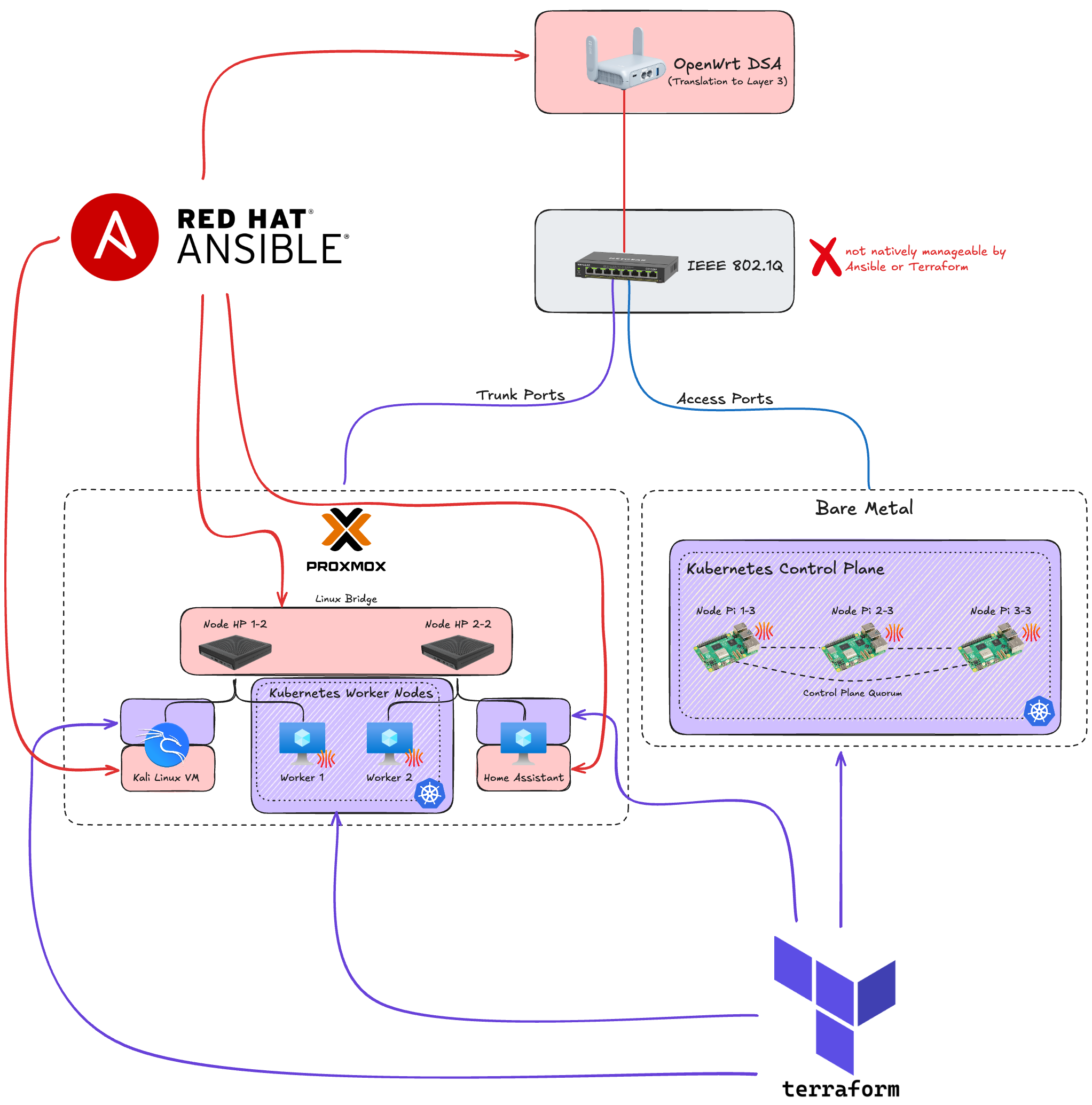
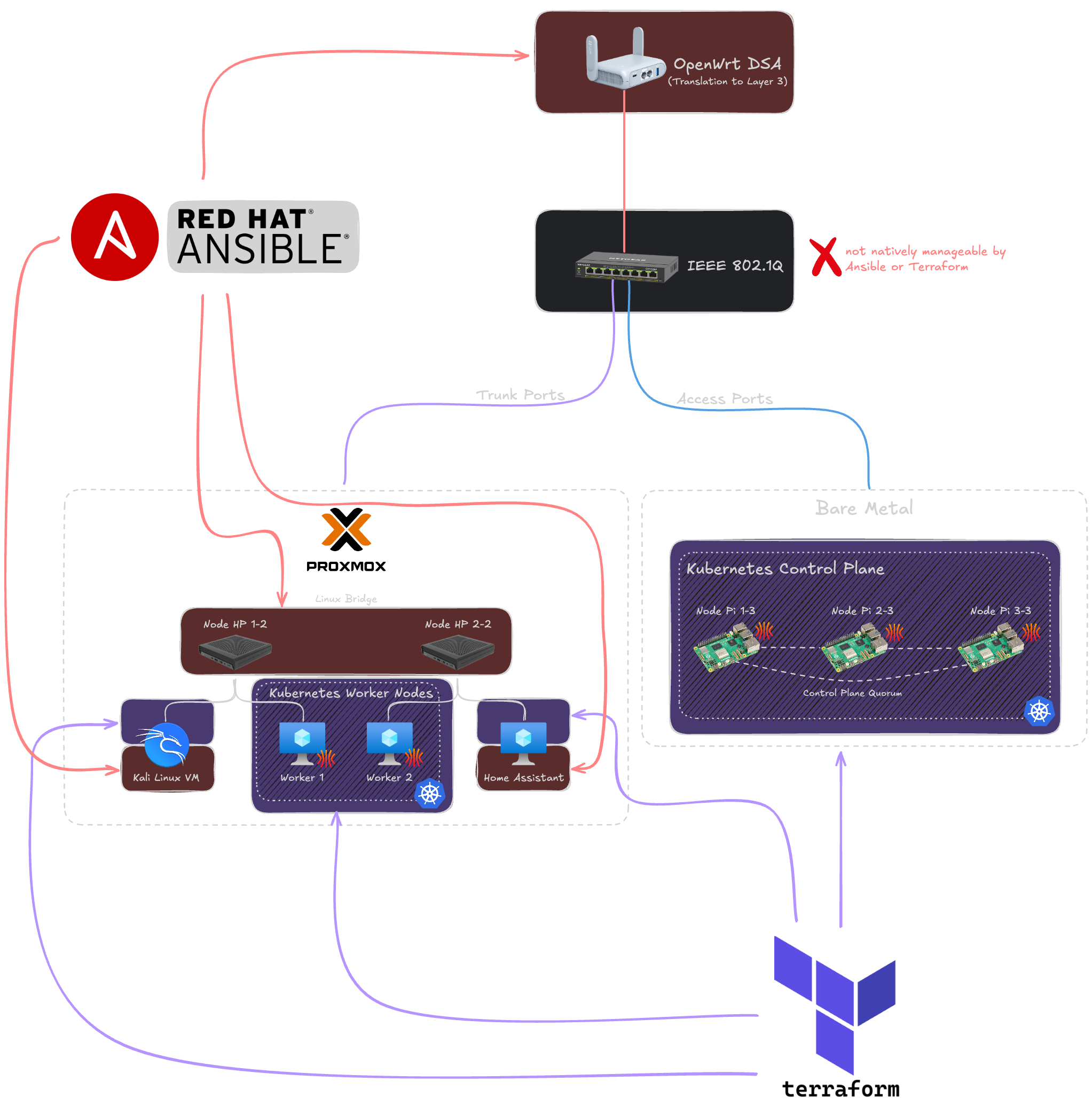 Fig 1: High-level mapping of automation tools to infrastructure components.
- Terraform (Provisioning): Responsible for immutable infrastructure. It orchestrates the creation of Proxmox VMs (allocating compute, storage, and network bridges) and handles the Kubernetes OS bootstrapping (Talos Linux) across both virtual worker nodes and bare-metal control planes.
- Ansible (Configuration): Responsible for stateful OS and service management. It configures the OpenWrt Layer 3 routing (DSA), sets up the Proxmox hypervisor baseline, and manages the guest OS configuration for standalone, non-K8s VMs (e.g. Kali Linux, Home Assistant).
- Hardware Exception: The Netgear L2 switch lacks API manageability. As formally accepted in ADR-004, it requires a manual, one-time "Day-Zero" setup to configure the static trunk and access ports.
Execution Pipeline
The following state diagram outlines the sequential execution phases required to bootstrap the environment from bare metal to a fully operational state.
graph TD
    subgraph aws_cloud [AWS Cloud / Single Source of Truth]
        aws_sm[(AWS Secrets Manager)]
    end

    subgraph phase0 [Phase 0: Secret Zero]
        p0_gen[Generate Passwords in RAM] --> p0_prov[Init OpenWrt VPN Gateway]
        p0_prov --> p0_push[Push Keys to AWS]
        p0_push -.->|Write| aws_sm
    end

    subgraph phase1 [Phase 1: Network]
        p1_fetch[Fetch OpenWrt Keys] -.->|Read| aws_sm
        p1_fetch --> p1_fork{Parallel Execution}

        p1_fork --> p1_openwrt[Ansible: OpenWrt Config via SSH/API]
        p1_fork --> p1_netgear[Manual: Netgear Out-of-Band Setup]
    end
    phase0 ==>|Triggers| p1_fetch

    subgraph phase2 [Phase 2: Proxmox Baseline]
        p2_fetch[Fetch Node Credentials] -.->|Read| aws_sm
        p2_fetch --> p2_config[Ansible: Host Config <br> Updates, NTP, VLAN-Bridge, ZFS Mirror]
    end
    p1_openwrt --> p2_fetch
    p1_netgear --> p2_fetch

    subgraph phase3 [Phase 3: Virtual Machines]
        p3_fetch[Fetch API Tokens] -.->|Read| aws_sm
        p3_fetch --> p3_prov[Terraform: Interface via PVE API <br> CPU, RAM, Disks]
        p3_prov --> p3_net[Network Assignment: Attach to VLANs]
    end
    p2_config ==>|Triggers| p3_fetch

    subgraph phase4 [Phase 4: Kubernetes OS]
        p4_fetch[Fetch K8s Bootstrap Secrets] -.->|Read| aws_sm
        p4_fetch --> p4_yaml[Terraform: Generate Talos Config YAML]
        p4_yaml --> p4_api[Bootstrap Nodes via API]
        p4_api --> p4_wait[Wait for etcd consensus / Quorum]
        p4_wait --> p4_kubeconfig[Fetch Kubeconfig]
    end
    p3_net ==>|Triggers| p4_fetch

    subgraph phase5 [Phase 5: Guest OS & Workloads]
        p5_fork{Parallel Execution}

        %% Kubernetes Workload Route
        p5_fork --> p5_wait_api[Wait for K8s API Readiness]
        p5_wait_api --> p5_eso[FluxCD: Deploy ESO]
        p5_eso -.->|Continuously Polls| aws_sm
        p5_eso --> p5_sync[ESO: Inject Native K8s Secrets]
        p5_sync --> p5_deploy[FluxCD: Deploy Longhorn, Traefik & Apps]

        %% Standard VM Route
        p5_fork --> p5_ansible_fetch[Fetch VM Credentials]
        p5_ansible_fetch -.->|Read| aws_sm
        p5_ansible_fetch --> p5_wait_ssh[Wait for VM SSH]
        p5_wait_ssh --> p5_vm_tools[Ansible: Config VMs <br> Kali & HomeAssistant]
    end
    p4_kubeconfig ==>|Triggers| p5_fork

    %% Styling
    style aws_cloud fill:transparent,stroke:#666,stroke-width:1px,stroke-dasharray: 5 5
    style phase0 fill:transparent,stroke:#666,stroke-width:1px,stroke-dasharray: 5 5
    style phase1 fill:transparent,stroke:#666,stroke-width:1px,stroke-dasharray: 5 5
    style phase2 fill:transparent,stroke:#666,stroke-width:1px,stroke-dasharray: 5 5
    style phase3 fill:transparent,stroke:#666,stroke-width:1px,stroke-dasharray: 5 5
    style phase4 fill:transparent,stroke:#666,stroke-width:1px,stroke-dasharray: 5 5
    style phase5 fill:transparent,stroke:#666,stroke-width:1px,stroke-dasharray: 5 5